Overview
Revit Intermediate builds on your foundational Revit and Building Information Modelling (BIM) skills, expanding your ability to develop coordinated building information for interior design development and project coordination using Autodesk Revit (release year 2026).
Designed for learners with foundational Revit experience, this course explores the tools and workflows used to create custom content, evaluate design options, manage project phasing, and coordinate information across multiple sources. You'll work with custom families, materials, wall assemblies, linked files, and worksharing tools while developing the skills needed to support model coordination and multidisciplinary project work.
Delivered fully online and self-paced, this SAIT Micro-credential combines demonstrations, guided exercises, discussion boards, and applied assignments with support from an industry-experienced instructor. The course culminates in a portfolio project that demonstrates your design process and application of intermediate Revit and BIM skills.
By the end of the course, you'll be prepared to manage project information, support model coordination, and apply intermediate BIM workflows within collaborative design environments. These practical skills can help you contribute to design development, project coordination, and documentation activities across architecture, engineering, construction, and interior design projects.
This course is ideal if you:
- want to extend your Revit abilities beyond foundational modelling
- need intermediate BIM skills to support coordination or design development
- are preparing for roles that require custom content creation or collaborative workflows
- want portfolio work that demonstrates your growing capability with Revit.
You must complete CADD 103 Revit Architecture Fundamentals before registering for this course.
Upon successful completion of this course, you'll be able to:
- locate and load predefined families and components into a project file using the installed content libraries from Autodesk
- identify, describe, and use System Families, In-Place Families, and Loadable Families
- customize your projects by creating and editing custom content families using instance and type parameters
- create, customize, and use materials to enhance visualizations
- use sweeps and reveals to customize walls
- setup and create design options in a project to aid in design selection and decision-making
- explain the concept and benefits of project worksharing and enable worksharing in Revit
- enable collaboration on Revit projects by creating and controlling worksets
- create and use the project phase function in Revit to visualize different stages of construction
- import and control CAD files in a project using the Link Files feature and the Visibility Graphics feature
- assemble a portfolio piece that showcases the design process and highlights the knowledge, skills, and abilities you’ve gained throughout your learning journey.
To request a course outline, contact ConEdAdvising@sait.ca.
Individuals with Revit training and industry experience can take exams through Autodesk to become Autodesk Certified User (ACU) or Autodesk Certified Professional (ACP) in Revit. SAIT’s Revit Essentials certificate program will help you build relevant skills and experience that support preparation for these certifications. Learn more about Autodesk certification.
Upcoming dates
Select an available section and add it to your cart. When you're ready, proceed to check out to sign into your student account and complete your registration.
Don't have a student account? Let's set one up!
Registration closes seven days before the start date for on-campus, online scheduled, and blended courses, and one day before the start date for online self-paced courses.
After you've completed this course
Upon successful completion of this course, you'll be able to self-print a proof of completion document from your Continuing Education student account.
Micro-credential
SAIT Micro-credentials develop practical skills aligned to current industry standards and include competency-based testing. Earning a SAIT Technical Skills Micro-credential demonstrates to employers that you have the required competencies — combining knowledge, skills and abilities — to get the job done. Learn more.
Students who complete this course with a final grade of A- (80%) or higher will earn the Micro-credential and receive a shareable digital badge that validates their achievement.
Costs
Textbook and reading list
Included in the purchase of this course, you'll receive:
- Access to online course content in Brightspace (D2L)
- Free access to Autodesk®Revit® 2026 software using Autodesk's Educational Plan. Software download instructions will be provided in D2L.
The following textbook is required and can be purchased from the SAIT Bookstore website:
- Design Integration Using Autodesk Revit 2026, Daniel John Stine, SDC Publications, 2025
Note: Make sure the book you purchase matches the Revit version used in your course section. The SAIT Bookstore carries the current and most recent previous versions.
Technology
To be successful in this course, you’ll need:
- Access to your own computer or laptop that meets system requirements for Revit 2026 and with standard hardware/software requirements to use D2L
- Internet access.
Financial support
Financial opportunities are available to help pay for your course fees. Learn more about how to reduce your education or training costs with available awards, bursaries, loans and grants, including the Canada Alberta Productivity Grant.
Applicable certificates
This course applies to the following certificate programs:
- Certification type
-
 Certificate of Completion

Train your team
Interested in group training opportunities for this course? Tell us about your organization's needs, and one of our training consultants will contact you within one business day.
Stories and news
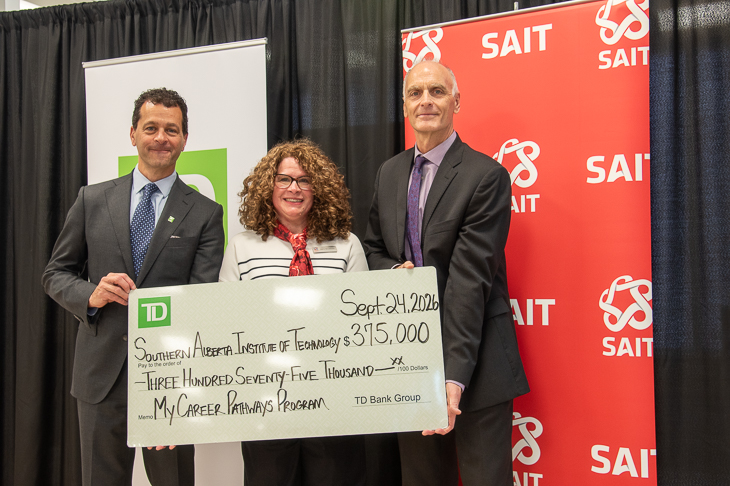
TD investment strengthens skills development and career exploration at SAIT
MEDIA RELEASE - The Southern Alberta Institute of Technology (SAIT) has received a second $375,000 commitment, over three years, from TD Bank Group (TD). This renewed investment aims to support My Career Pathways.

New SAIT and Mastercard partnership targets cybersecurity gaps facing Canada’s small businesses and non-profits
MEDIA RELEASE - SAIT and Mastercard collaborate to expand access to cybersecurity learning and help organizations in Western Canada strengthen their digital resilience.

Oki, Âba wathtech, Danit'ada, Tawnshi, Hello.
SAIT is located on the traditional territories of the Niitsitapi (Blackfoot) and the people of Treaty 7 which includes the Siksika, the Piikani, the Kainai, the Tsuut’ina and the Îyârhe Nakoda of Bearspaw, Chiniki and Goodstoney.
We are situated in an area the Blackfoot tribes traditionally called Moh’kinsstis, where the Bow River meets the Elbow River. We now call it the city of Calgary, which is also home to the Métis Nation of Alberta.