Overview
Revit Architecture Fundamentals brings your building design ideas to life using Autodesk® Revit® 2026, the industry-leading Building Information Modelling (BIM) platform used to design, document, and visualize buildings. In this first course for the Revit Essentials Certificate, you'll develop foundational modelling and documentation skills while learning how BIM workflows support architecture, engineering, and construction projects.
Designed for learners who are new to Revit or building information modelling, this course explores the tools and workflows used to develop architectural models and project documentation. You'll create and modify floor plans, elevations, sections, roofs, ceilings, and other building elements while learning to work with annotations, site features, visualization tools, and drawing sheets. Throughout the course, you'll develop a three-dimensional building model and gain practical experience producing coordinated project deliverables that communicate design intent.
Delivered fully online and self-paced course combines guided exercises, applied assignments, and project-based learning that reflects industry-standard BIM workflows. You'll receive feedback and support from an industry-experienced instructor as you strengthen your Revit skills and complete a portfolio project that showcases your design process and project work.
By the end of the course, you'll be prepared to create and manage foundational Revit models, produce architectural drawings and documentation, and support building design projects using industry-standard digital modelling practices. These practical skills provide a strong foundation for further Revit study and can support entry-level modelling, documentation, and coordination tasks within architecture, engineering, and construction environments.
This course is ideal if you:
- want to build practical BIM skills for roles in architecture, engineering, or construction
- need Revit proficiency to support modelling, documentation, or coordination tasks
- are transitioning into BIM-focused responsibilities or roles
- want portfolio-quality work that demonstrates job-ready digital skills.
There are no prerequisites or eligibility requirements for this course.
We strongly recommend that you have at least 50% in Math 30-1 or an equivalent course completed through Academic Upgrading. Any prior education or work experience will be an asset, and a basic understanding of building construction and documentation can help you feel more prepared.
Upon successful completion of this course, you'll be able to:
- navigate and explain the user interface, the Project Browser, terminology, and working in the views
- use the Revit workflow to create and modify a model
- apply basic drawing and editing tools in 2D views
- create a 3D building model with walls, windows, doors, floors, ceilings, and roofs
- use Revit to critically analyze, design, and illustrate architectural systems from a human-centred perspective
- create vertical circulation elements such as stairs, railings, ramps, and sloped floors
- apply the Annotation tools for adding notes, dimensions, and tags
- model site elements and topography
- construct camera views and create 3D visualization renderings
- create drawing sheets and populate with several views
- assemble a portfolio piece that showcases the drafting process and highlights the knowledge, skills, and abilities you’ve gained throughout your learning journey.
To request a course outline, contact ConEdAdvising@sait.ca.
Individuals with Revit training and industry experience can take exams through Autodesk to become Autodesk Certified User (ACU) or Autodesk Certified Professional (ACP) in Revit. SAIT’s Revit Essentials certificate program will help you build relevant skills and experience that support preparation for these certifications. Learn more about Autodesk certification.
CADD 103 is the perfect way to test the waters of 3D drafting through Revit! It’s fun, challenging and creative to learn step by step the possibilities of drafting. The best part is I can expand my knowledge as a working professional from home to further into a new exciting career. Thank you SAIT!
Robyn Goldsmith
Upcoming dates
Select an available section and add it to your cart. When you're ready, proceed to check out to sign into your student account and complete your registration.
Don't have a student account? Let's set one up!
Registration closes seven days before the start date for on-campus, online scheduled, and blended courses, and one day before the start date for online self-paced courses.
After you've completed this course
Upon successful completion of this course, you'll be able to self-print a proof of completion document from your Continuing Education student account.
Micro-credential
SAIT Micro-credentials develop practical skills aligned to current industry standards and include competency-based testing. Earning a SAIT Technical Skills Micro-credential demonstrates to employers that you have the required competencies — combining knowledge, skills and abilities — to get the job done. Learn more.
Students who complete this course with a final grade of A- (80%) or higher will earn the Micro-credential and receive a shareable digital badge that validates their achievement.
Costs
Textbook and reading list
Included in the purchase of this course, you'll receive:
- Access to online course content in Brightspace (D2L)
- Free access to Autodesk®Revit®2026 software using Autodesk's Educational Plan. Software download instructions will be provided in D2L.
The following textbook is required and can be purchased from the SAIT Bookstore website:
- Design Integration Using Autodesk Revit 2026 by Daniel John Stine, SDC Publications, 2025
Note: Make sure the book you purchase matches the Revit version used in your course section. The SAIT Bookstore carries the current and most recent previous versions.
Technology
To be successful in this course, you’ll need:
- Access to your own computer or laptop that meets system requirements for Revit 2026 and with standard hardware/software requirements to use D2L
- Internet access.
Financial support
Financial opportunities are available to help pay for your course fees. Learn more about how to reduce your education or training costs with available awards, bursaries, loans and grants, including the Canada Alberta Productivity Grant.
Applicable certificates
This course applies to the following certificate programs:
- Certification type
-
 Certificate of Completion

Train your team
Interested in group training opportunities for this course? Tell us about your organization's needs, and one of our training consultants will contact you within one business day.
Stories and news
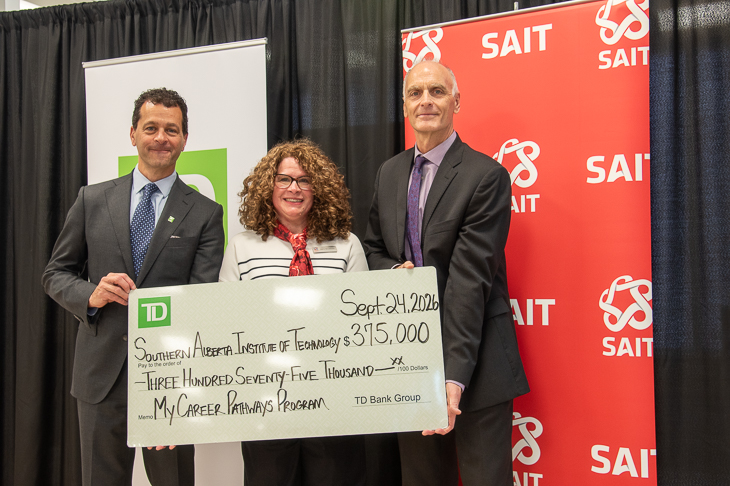
TD investment strengthens skills development and career exploration at SAIT
MEDIA RELEASE - The Southern Alberta Institute of Technology (SAIT) has received a second $375,000 commitment, over three years, from TD Bank Group (TD). This renewed investment aims to support My Career Pathways.

New SAIT and Mastercard partnership targets cybersecurity gaps facing Canada’s small businesses and non-profits
MEDIA RELEASE - SAIT and Mastercard collaborate to expand access to cybersecurity learning and help organizations in Western Canada strengthen their digital resilience.

Oki, Âba wathtech, Danit'ada, Tawnshi, Hello.
SAIT is located on the traditional territories of the Niitsitapi (Blackfoot) and the people of Treaty 7 which includes the Siksika, the Piikani, the Kainai, the Tsuut’ina and the Îyârhe Nakoda of Bearspaw, Chiniki and Goodstoney.
We are situated in an area the Blackfoot tribes traditionally called Moh’kinsstis, where the Bow River meets the Elbow River. We now call it the city of Calgary, which is also home to the Métis Nation of Alberta.