Overview
Creating great photographs is only part of the process. A well-organized digital workflow helps you find, refine, and share your images while maintaining a growing collection of photographic work.
In this course, you’ll use Adobe Lightroom Classic to organize, edit, and prepare digital photographs using industry-standard workflow practices. You’ll explore Lightroom’s Library, Develop, Print, Book, and Web modules, along with metadata, keywords, collections, non-destructive editing, colour and tonal adjustments, masking tools, and AI-powered features.
Through live online workshops and hands-on exercises, you’ll apply Lightroom tools to your own digital image collection. You’ll practise cataloguing and editing photographs and preparing them for print, online publishing, presentations, portfolios, websites, and books.
By the end of the course, you’ll be able to maintain an organized image library and apply a consistent editing process. You’ll also be prepared to produce photographs for creative, professional, business, and personal uses.
This course is ideal if you:
- work with a growing collection of digital photographs and need a more structured approach
- use images for content creation, marketing, communications, business, or creative projects
- want greater control over how your photographs are selected, refined, and presented
- are ready to move beyond basic photo-editing tools and use Adobe Lightroom Classic.
There are no prerequisites or eligibility requirements for this course. However, PHOT 021 Photography Foundations 1 or equivalent experience with digital photography, camera operation, and managing digital image files is strongly recommended.
Upon successful completion of this course, you'll be able to:
- create a library within Lightroom
- explain Lightroom’s key organizational components
- apply the different photo development settings and explore generative AI using Lightroom Sensei
- create images to export for a gallery showing and/or printable book
- demonstrate ability to create a website and/or prints.
To request a course outline, contact ConEdAdvising@sait.ca.
Upcoming dates
Select an available section and add it to your cart. When you're ready, proceed to check out to sign into your student account and complete your registration.
Don't have a student account? Let's set one up!
Register early!
- We recommend registering at least three weeks before the course section start date to support course planning and help ensure a smooth start to your course.
- Course sections require minimum enrollment and may be rescheduled or cancelled two weeks before the start date.
- Registration closes seven days before the start date for on-campus, online scheduled and blended courses, and three days before the start date for online self-paced courses.
After you've completed this course
Upon successful completion of this course, you'll be able to self-print a proof of completion document from your Continuing Education student account.
Costs
Textbook and reading list
Included in the purchase of this course, you'll receive access to online course content in Brightspace (D2L).
Technology
To be successful in this course, you’ll need:
- Your own computer or laptop that meets system requirements for Adobe Lightroom Classic and standard hardware/software requirements to use D2L
- Functional webcam and microphone
- Internet access
- An external hard drive with at least 500 GB available storage space and a USB cable to connect from the drive to your computer.
Though not required, a second monitor or additional device may be helpful during live online sessions.
Note: Before the start of the first class, please purchase your Adobe Creative Cloud subscription that includes Adobe Lightroom Classic and install it on your computer. Educational pricing is available, and you can use your SAIT “edu” email address as proof of student status to access the software at a reduced rate.
Financial support
Financial opportunities are available to help pay for your course fees. Learn more about how to reduce your education or training costs with available awards, bursaries, loans and grants, including the Canada Alberta Productivity Grant.
Related courses you may like
- Certification type
-
 Micro-Credential
- Certification type
-
Micro-Credential
- Certification type
-
Micro-Credential

Train your team
Interested in group training opportunities for this course? Tell us about your organization's needs, and one of our training consultants will contact you within one business day.
Stories and news
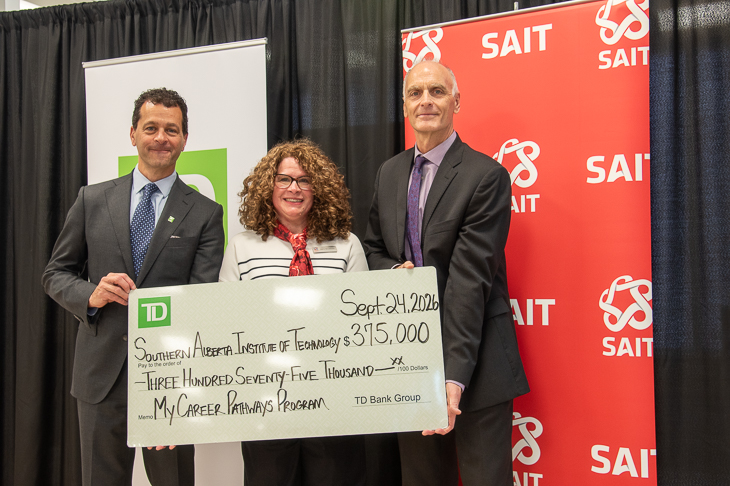
TD investment strengthens skills development and career exploration at SAIT
MEDIA RELEASE - The Southern Alberta Institute of Technology (SAIT) has received a second $375,000 commitment, over three years, from TD Bank Group (TD). This renewed investment aims to support My Career Pathways.

New SAIT and Mastercard partnership targets cybersecurity gaps facing Canada’s small businesses and non-profits
MEDIA RELEASE - SAIT and Mastercard collaborate to expand access to cybersecurity learning and help organizations in Western Canada strengthen their digital resilience.

Oki, Âba wathtech, Danit'ada, Tawnshi, Hello.
SAIT is located on the traditional territories of the Niitsitapi (Blackfoot) and the people of Treaty 7 which includes the Siksika, the Piikani, the Kainai, the Tsuut’ina and the Îyârhe Nakoda of Bearspaw, Chiniki and Goodstoney.
We are situated in an area the Blackfoot tribes traditionally called Moh’kinsstis, where the Bow River meets the Elbow River. We now call it the city of Calgary, which is also home to the Métis Nation of Alberta.