Overview
Prepare for CompTIA A+ certification and success in the ever-evolving IT field.
This course is designed for aspiring IT professionals seeking a comprehensive foundation and is ideal for beginners or those transitioning into IT roles.
You'll explore the installation, management and configuration of Windows desktop operating systems with a comprehensive overview of Linux, MacOS and Windows Server operating systems. Key topics include Windows 11 installation, cloud computing, virtualization, Active Directory and file system encryption.
You'll also develop expertise in troubleshooting, addressing challenges in DRM and software licensing and managing peripheral devices. The curriculum extends to Linux application management and disaster recovery planning for Windows, MacOS and Linux. Practical skills include analyzing Windows boot processes, configuring Active Directory and setting up remote services such as VPNs on Windows clients.
Completing this course along with CMPH 003 - A+ Networking and IOT will give you the theoretical knowledge and applied experience necessary to challenge the CompTIA A+ certification and embark on a dynamic career in IT.
You must complete CMPH 001 - A+ In-Depth - Hardware and Peripherals before registering for this course.
Upon completion of this course, you'll be able to:
- plan, install, update and configure Windows 11
- understand the benefits of cloud computing and virtualization
- understand how to use, manage and configure several Windows system components, system tools, general applications, Performance Monitor and virtual memory while performing basic Windows troubleshooting steps and recognizing the challenges presented by DRM and software licensing
- install and manage Linux applications
- update and backup Windows, MacOS and Linux operating systems and prepare for disaster recovery on Windows
- analyze the Windows boot and start-up process and related troubleshooting
- manage files and folders through the use of file system permissions, utilities and encryption
- configure Active Directory Users and Computers to create user accounts and security groups on Windows Server
- configure remote services, including a Virtual Private Network (VPN) on a Windows client
- understand how to manage and support several types of peripheral devices.
This is a preparatory course to be taken in advance of a CompTIA A+ certification exam. The official certification exam is not included in this course and may be booked separately through CompTIA.
My experience at SAIT is excellent in either doing continuing education or the IT A+ certification. Their curriculum is very relevant to the subjects and easy to follow.
Romana Afroz
Upcoming dates
Select an available section and add it to your cart. When you're ready, proceed to check out to sign into your student account and complete your registration.
Don't have a student account? Let's set one up!
Register early!
- We recommend registering at least three weeks before the course section start date to support course planning and help ensure a smooth start to your course.
- Course sections require minimum enrollment and may be rescheduled or cancelled two weeks before the start date.
- Registration closes seven days before the start date for on-campus, online scheduled and blended courses, and three days before the start date for online self-paced courses.
After you've completed this course
Upon successful completion of this course, you'll be able to self-print a proof of completion document from your Continuing Education student account.
Costs
Textbook and reading list
All required course materials are included in your tuition fees.
Technology
To be successful in this course, you’ll need:
- Access to your own computer or laptop with standard hardware/software requirements.
- Internet access
- TestOutPC Pro software
A functional webcam and microphone are recommended to allow for a more collaborative learning experience.
Financial support
Financial opportunities are available to help pay for your course fees. Learn more about how to reduce your education or training costs with available awards, bursaries, loans and grants, including the Canada Alberta Productivity Grant.
Applicable certificates
This course applies to the following certificate programs:
- Certification type
-
 Certificate of Achievement

Train your team
Interested in group training opportunities for this course? Tell us about your organization's needs, and one of our training consultants will contact you within one business day.
Stories and news
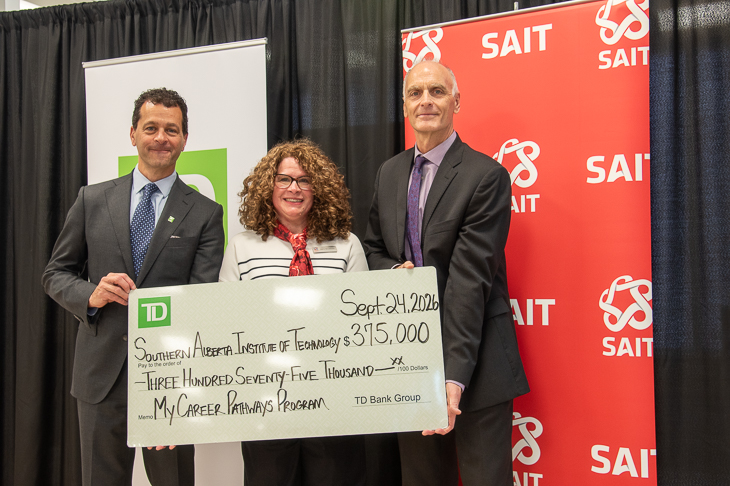
TD investment strengthens skills development and career exploration at SAIT
MEDIA RELEASE - The Southern Alberta Institute of Technology (SAIT) has received a second $375,000 commitment, over three years, from TD Bank Group (TD). This renewed investment aims to support My Career Pathways.

New SAIT and Mastercard partnership targets cybersecurity gaps facing Canada’s small businesses and non-profits
MEDIA RELEASE - SAIT and Mastercard collaborate to expand access to cybersecurity learning and help organizations in Western Canada strengthen their digital resilience.

Oki, Âba wathtech, Danit'ada, Tawnshi, Hello.
SAIT is located on the traditional territories of the Niitsitapi (Blackfoot) and the people of Treaty 7 which includes the Siksika, the Piikani, the Kainai, the Tsuut’ina and the Îyârhe Nakoda of Bearspaw, Chiniki and Goodstoney.
We are situated in an area the Blackfoot tribes traditionally called Moh’kinsstis, where the Bow River meets the Elbow River. We now call it the city of Calgary, which is also home to the Métis Nation of Alberta.